Please help to click 1!

Sunday, 2 January 2022

Microsoft Exchange Y2K22 bug


According to numerous reports from Microsoft Exchange admins worldwide, a bug in the FIP-FS engine is blocking email delivery with on-premise servers starting at midnight on January 1st, 2022.

Security researcher and Exchange admin Joseph Roosen said that this is caused by Microsoft using a signed int32 variable to store the value of a date, which has a maximum value of 2,147,483,647.

However, dates in 2022 have a minimum value of 2,201,010,001 or larger, which is greater than the maximum value that can be stored in the signed int32 variable, causing the scanning engine to fail and not release mail for delivery.

When this bug is triggered, an 1106 error will appear in the Exchange Server's Event Log stating, "The FIP-FS Scan Process failed initialization. Error: 0x8004005. Error Details: Unspecified Error" or "Error Code: 0x80004005. Error Description: Can't convert "2201010001" to long."

Microsoft will need to release an Exchange Server update that uses a larger variable to hold the date to officially fix this bug.

However, for on-premise Exchange Servers currently affected, admins have found that you can disable the FIP-FS scanning engine to allow email to start delivering again.

To disable the FIP-FS scanning engine, you can execute the following PowerShell commands on the Exchange Server:

Set-MalwareFilteringServer -Identity  -BypassFiltering $true
Restart-Service MSExchangeTransport

After the MSExchangeTransport service is restarted, mail will start being delivered again.

Unfortunately, with this unofficial fix, delivered mail will no longer be scanned by Microsoft's scanning engine, leading to more malicious emails and spam getting through to users.

Microsoft has confirmed that they are working on a fix and hope to have more information available later today.

We are aware of and working on an issue causing messages to be stuck in transport queues on Exchange Server 2016 and Exchange Server 2019. The problem relates to a date check failure with the change of the new year and it not a failure of the AV engine itself. This is not an issue with malware scanning or the malware engine, and it is not a security-related issue. The version checking performed against the signature file is causing the malware engine to crash, resulting in messages being stuck in transport queues.

We are actively working on resolving this issue and expect to release details on how to resolve this issue later today. In the meantime, if your organization performs malware scanning of messages outside of your on-premises Exchange servers (for example, by routing mail through Exchange Online, or by using a third-party message hygiene solution), you can bypass or disable malware scanning on your Exchange servers and clear your transport queues. You should use one of these workarounds only if you have an existing malware scanner for email other than the engine in Exchange Server. 

BleepingComputer has also contacted Microsoft about the problem but has not received a response yet.

Disable SSH Root Login


To disable root login, open the main ssh configuration file /etc/ssh/sshd_config with your choice of editor.

# vi /etc/ssh/sshd_config

Search for the following line in the file.

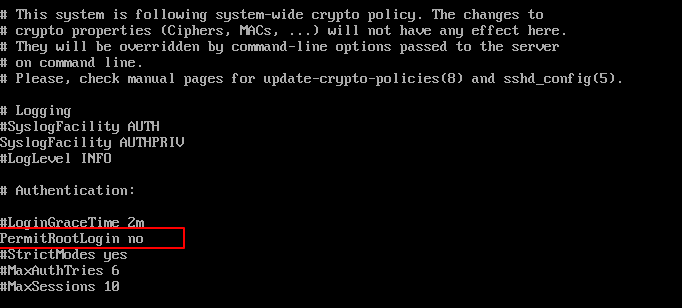
#PermitRootLogin no

Remove the ‘#‘ from the beginning of the line.  Make the line look similar to this.

PermitRootLogin no
Disable Root Login in Linux

Next, we need to restart the SSH daemon service.

# systemctl restart sshd
OR
# /etc/init.d/sshd restart

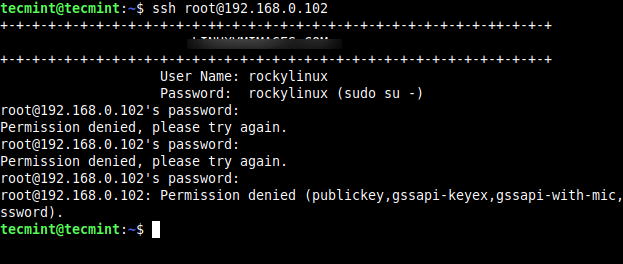
Now try to log in with the root user, you will get a “Permission denied” error.

$ ssh root@192.168.0.102
root@192.168.0.102's password: 
Permission denied, please try again.
SSH Permission Denied Error

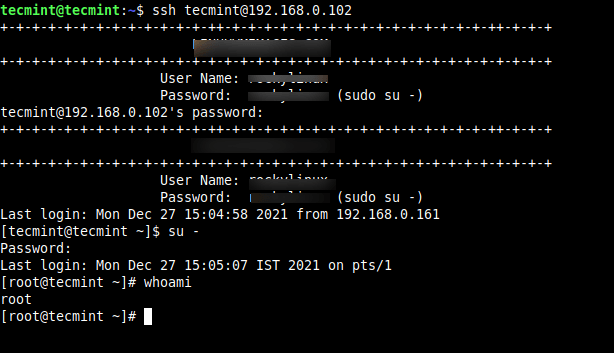
So, from now onwards login as a normal user and then use the ‘su’ command to switch to root user.

$ ssh root@192.168.0.102
tecmint@192.168.0.102's password:
Last login: Mon Dec 27 15:04:58 2021 from 192.168.0.161

$ su -
Password:
Last login: Mon Dec 27 15:05:07 IST 2021 on pts/1
SSH User Login
SSH User Login

Saturday, 1 January 2022

Microsoft Loop is a new collobration tool for hybrid work era

Microsoft Loop has three main elements: 

Loop components, 

Loop pages, and 

Loop workspaces. 

Loop components are live pieces of content that can exist across multiple apps, updated in real time and free for anyone to jump into. That could be a list shared in a Teams channel and also editable in a Loop page, or notes in a calendar entry that are also available to be pasted into Outlook and edited in real time within an email.


Microsoft’s new Loop app brings together all of its Fluid component work.
Image: Microsoft

These components can also exist in the main Microsoft Loop hub, inside what Microsoft calls shared Loop workspaces. It’s almost like a project board, where you can see a list of all Loop components and Loop pages and who is currently working on them. Think of it as a modern File Explorer, where everything is live and collaborative.

Loop pages are the individual canvases where people can share and collaborate on Loop components. It’s like a modern version of a whiteboard but far more powerful because you can insert and share components that people have created outside of Loop. Not everyone even needs to be part of the entire Loop page, as the individual components could be edited in real time from other apps.

Microsoft’s Loop components can live across multiple apps.
Image: Microsoft

These collaborative Loop components have been the dream of Microsoft for the past couple of years, and it’s clear the company has been adjusting how Loop works to fit the realities of pandemic life. A central Microsoft Loop hub looks like an improved way to track and organize these components — and a clear response to the new hybrid work era to which many businesses are adjusting and competition like Notion.

Microsoft’s demonstrations of Loop components have been impressive so far, but we’ll need to experience them for ourselves to really understand whether Loop can truly deliver the seamless experience that Microsoft keeps promising. Notion has been challenging Microsoft’s traditional Office way of working with many concepts that are similar to Loop, and Microsoft’s response looks like a more powerful version of Notion.

While Microsoft has been talking about Loop (Fluid) for nearly 18 months, it’s still not something that’s inside Office apps yet. Microsoft Loop components will now arrive in Teams, Outlook, and OneNote this month, and the main Microsoft Loop app will be released at a later date.

Saturday, 6 May 2017

SQL注入防御与绕过的几种姿势

一、 PHP几种防御姿势
1. 关闭错误提示
说明:
PHP配置文件php.ini中的display_errors=Off,这样就关闭了错误提示。
2. 魔术引号
说明:
当php.ini里的magic_quotes_gpc=On时。提交的变量中所有的单引号(')、双引号(")、反斜线(\)与 NUL(NULL 字符)会自动转为含有反斜线的转义字符。
魔术引号(Magic Quote)是一个自动将进入 PHP 脚本的数据进行转义的过程。(对所有的 GET、POST 和 COOKIE 数据自动运行转义)
PHP 5.4 之前 PHP 指令 magic_quotes_gpc 默认是 on。
本特性已自PHP 5.3.0 起废弃并将自 PHP 5.4.0 起移除,在PHP 5.4.O 起将始终返回 FALSE。
参考:
《magic_quotes_gpc相关说明》:
3. addslashes
说明:
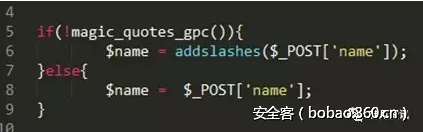
addslashes函数,它会在指定的预定义字符前添加反斜杠转义,这些预定义的字符是:单引号(')、双引号(")、反斜线(\)与 NUL(NULL 字符)。
这个函数的作用和magic_quotes_gpc一样。所以一般用addslashes前会检查是否开了magic_quotes_gpc。
http://p9.qhimg.com/t01b9cc5ebd329c3951.png
magic_quotes_gpc与addslashes的区别用法:
1)对于magic_quotes_gpc=on的情况
我们可以不对输入和输出数据库的字符串数据作addslashes()和stripslashes()的操作,数据也会正常显示。
如果此时你对输入的数据作了addslashes()处理,那么在输出的时候就必须使用stripslashes()去掉多余的反斜杠。
2)对于magic_quotes_gpc=off 的情况
必须使用addslashes()对输入数据进行处理,但并不需要使用stripslashes()格式化输出,
因为addslashes()并未将反斜杠一起写入数据库,只是帮助mysql完成了sql语句的执行。
参考:
《addslashes函数说明》:
《对于magic_quotes_gpc的一点认识》:
4. mysql_real_escape_string
说明:
mysql_real_escape_string()函数转义 SQL 语句中使用的字符串中的特殊字符。
下列字符受影响:
  1. \x00 
  2. \n 
  3. \r 
  4. \x1a 
如果成功,则该函数返回被转义的字符串。如果失败,则返回 false。
本扩展自 PHP5.5.0 起已废弃,并在自 PHP 7.0.0 开始被移除。
因为完全性问题,建议使用拥有Prepared Statement机制的PDO和MYSQLi来代替mysql_query,使用的是mysqli_real_escape_string
参考:
《 PHP防SQL注入不要再用addslashes和mysql_real_escape_string了》:
《PDO防注入原理分析以及使用PDO的注意事项》:
5. htmlspecialchars()
说明:
htmlspecialchars()函数把预定义的字符转换为 HTML实体。
预定义的字符是:
  1. & (和号)成为 & 
  2. " (双引号)成为 " 
  3. ' (单引号)成为 ' 
  4. < (小于)成为 &lt; 
  5. > (大于)成为 &gt; 
6. 用正则匹配替换来过滤指定的字符
  1. preg_match 
  2. preg_match_all() 
  3. preg_replace 
参考:
《preg_match说明》:
《preg_replace说明》:
7. 转换数据类型
说明:
根据「检查数据类型」的原则,查询之前要将输入数据转换为相应类型,如uid都应该经过intval函数格式为int型。
8. 使用预编译语句
说明:
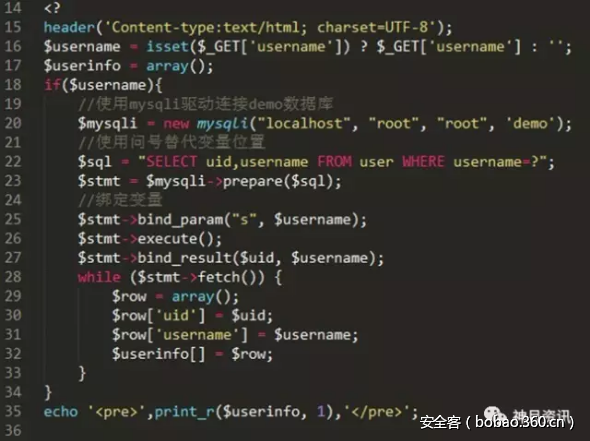
绑定变量使用预编译语句是预防SQL注入的最佳方式,因为使用预编译的SQL语句语义不会发生改变,在SQL语句中,变量用问号?表示,攻击者无法改变SQL语句的结构,从根本上杜绝了SQL注入攻击的发生。
代码示例:
http://p6.qhimg.com/t011554d1448b3f5840.png
参考:
《Web安全之SQL注入攻击技巧与防范》:
二、 几种绕过姿势
下面列举几个防御与绕过的例子:
例子1:addslashes
防御:
http://p5.qhimg.com/t01bd6f0a9c2f97bc13.png
这里用了addslashes转义。
绕过:
  • 将字符串转为16进制编码数据或使用char函数(十进制)进行转化(因为数据库会自动把16进制转化)
  • 用注释符去掉输入密码部分如“-- /* #”
payload:
  1. http://localhost/injection/user.php?username=admin-- hack 
(因为有的SQL要求--后要有空格,所以此处加上了hack)
  1. http://localhost/injection/user.php?username=admin/* 
(escape不转义/*)
  1. http://localhost/injection/user.php?username=admin%23 
(这里的%23即为#,注释掉后面的密码部分。注意IE浏览器会将#转换为空)
  1. http://localhost/injection/user.php?username=0x61646d696e23 
(admin# -->0x61646d696e23)
  1. http://localhost/injection/user.php?username=CHAR(97,100, 109, 105, 110, 35) 
(admin# -->CHAR(97, 100, 109, 105, 110, 35))
关于编码原理:
因为一般前端JavaScript都会escape()、encodeURL或encodeURIComponent编码再传输给服务器,主要为encodeURL,如下,所以可以利用这点。
JavaScript代码如:
JavaScript代码
拦截请求:
http://p4.qhimg.com/t018cafe605b0f54abb.png
1)escape( )
对ASCII字母、数字、标点符号"@* _ + - . /"不进行编码。在\u0000到\u00ff之间的符号被转成%xx的形式,其余符号被转成%uxxxx的形式。(注意escape()不对"+"编码,而平时表单中的空格会变成+)
2) encodeURL
对" ; / ? : @ & = + $ , # ' "不进行编码。编码后,它输出符号的utf-8形式,并且在每个字节前加上%。
3) encodeURIComponent
用于对URL的组成部分进行个别编码,而不用于对整个URL进行编码。
常用编码:  
  1. @ * _ + - ./ ;  \ ? : @ & = + $ , # ' 空格 
转码工具可用:
参考:
《URL编码》:
例子2:匹配过滤
防御:
http://p1.qhimg.com/t011ef7d8ad83689108.png
绕过:
关键词and,or常被用做简单测试网站是否容易进行注入攻击。这里给出简单的绕过使用&&,||分别替换and,or。
  • 过滤注入: 1 or 1 = 1 1 and 1 = 1
  • 绕过注入: 1 || 1 = 1 1 && 1 = 1
关于preg_match过滤可以看参考文章,文章里讲得很详细了。
参考:
《高级SQL注入:混淆和绕过》:
例子3:strstr
防御:
http://p3.qhimg.com/t01e38d15cd0ba68f9d.png
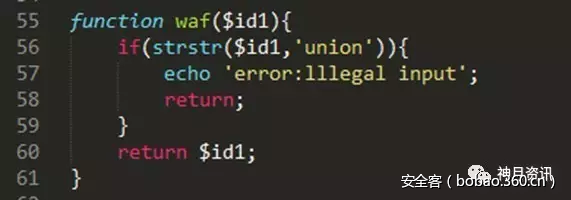
strstr ()查找字符串的首次出现,该函数区分大小写。如果想要不区分大小写,使用stristr()。(注意后面这个函数多了个i)
绕过:
strstr()函数是对大小写敏感的,所以我们可以通过大小写变种来绕过
payload:
  1. http://localhost/injection/user.php?id=1uNion select null,null,null 
例子4:空格过滤
防御:
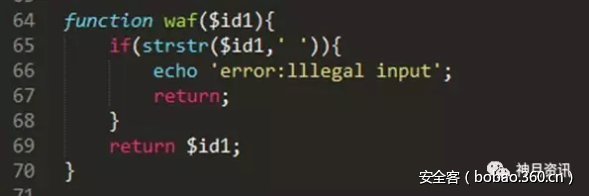
http://p7.qhimg.com/t0197f1f3f7332c497a.png
绕过:
1)使用内联注释。
2)使用换行符代替空格。注意服务器若为Windows则换行符为%0A%0D,Linux则为%0A。
  1. http://localhost/injection/user.php?id=1/**/and/**/11=1 
  2. http://localhost/injection/user.php?id=1%0A%0Dand%0A%0D1=1 
例子5:空字节
通常的输入过滤器都是在应用程序之外的代码实现的。比如入侵检测系统(IDS),这些系统一般是由原生编程语言开发而成,比如C++,为什么空字节能起作用呢,就是因为在原生变成语言中,根据字符串起始位置到第一个出现空字节的位置来确定字符串长度。所以说空字节就有效的终止了字符串。
绕过:
只需要在过滤器阻止的字符串前面提供一个采用URL编码的空字节即可。
payload:
http://p3.qhimg.com/t010b93647c17389bbf.png
例子6:构造故意过滤
防御:
http://p9.qhimg.com/t01bb2f5ae28aa52562.png
绕过:
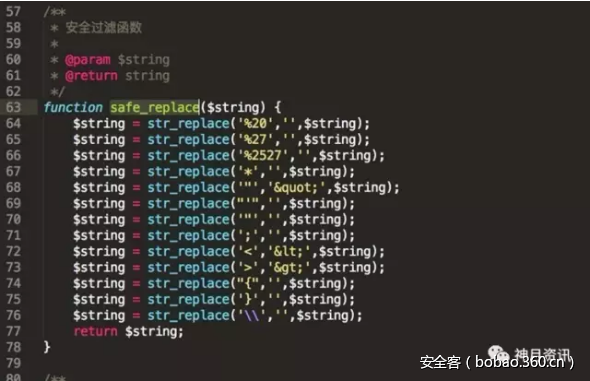
文件的63行开始可以看到,此处将传入的%27和%2527都进行删除处理,也就是还没传入数据库前就已经被该死的程序吃了,但是在67行看到他还吃了*,这样我们就有办法了,我们构造%*27,这样程序吃掉星号*后,%27就会被传入。
payload:    
  1. http://localhost/injection/user.php?id%3D1%*27%*20and%*20%*271%*27%3D%*271 
(id=1' and '1'='1-->id%3D1%*27%*20and%*20%*271%*27%3D%*271)

Monday, 8 July 2013

Microsoft Security Bulletin Advance Notification for July 2013

This advance notification provides a number as the bulletin identifier, because the official Microsoft Security Bulletin numbers are not issued until release. The bulletin summary that replaces this advance notification will have the proper Microsoft Security Bulletin numbers (in the MSyy-xxx format) as the bulletin identifier.
The following table summarizes the security bulletins for this month in order of severity.
For details on affected software, see the next section, Affected Software.
Bulletin IDMaximum Severity Rating and Vulnerability ImpactRestart RequirementAffected Software
Bulletin 1Critical
Remote Code Execution
May require restartMicrosoft .NET Framework,
Microsoft Silverlight
Bulletin 2Critical
Remote Code Execution
Requires restartMicrosoft Windows
Bulletin 3Critical
Remote Code Execution
May require restartMicrosoft Windows,
Microsoft Office,
Microsoft Visual Studio,
Microsoft Lync
Bulletin 4Critical
Remote Code Execution
Requires restartMicrosoft Windows,
Internet Explorer
Bulletin 5Critical
Remote Code Execution
May require restartMicrosoft Windows
Bulletin 6Critical
Remote Code Execution
May require restartMicrosoft Windows
Bulletin 7Important
Elevation of Privilege
Does not require restartMicrosoft Security Software

Tuesday, 4 June 2013

Retirement of Red Hat Enterprise Linux 6.1 Extended Update Support (EUS).

1. Summary:

This is the final notification for the retirement of Red Hat Enterprise
Linux 6.1 Extended Update Support (EUS).

2. Relevant releases/architectures:

Red Hat Enterprise Linux Server EUS (v. 6.1) - i386, ppc64, s390x, x86_64

3. Description:

In accordance with the Red Hat Enterprise Linux Errata Support Policy,
Extended Update Support for Red Hat Enterprise Linux 6.1 was retired on
May 31, 2013, and support is no longer provided. Accordingly, Red Hat will
no longer provide updated packages, including critical impact security
patches or urgent priority bug fixes, for Red Hat Enterprise Linux 6.1 EUS.
In addition, technical support through Red Hat's Global Support Services is
no longer provided.

Note: This notification applies only to those customers with subscriptions
to the Extended Update Support (EUS) channels for Red Hat Enterprise Linux
6.1.

We encourage customers to plan their migration from Red Hat Enterprise
Linux 6.1 to a more recent version of Red Hat Enterprise Linux 6. As a
benefit of the Red Hat subscription model, customers can use their active
subscriptions to entitle any system on a currently supported Red Hat
Enterprise Linux 6 release (6.2, 6.3, or 6.4, for which EUS is available).

Wednesday, 20 March 2013

Ubuntu to halve support length for non-LTS releases

The reduction in support for non-LTS releases from 18 to nine months should give the developers more time to concentrate on testing the packages to which users will be able to upgrade between major releases. No decisions have been taken, apparently, on how the up-to-date packages will be delivered to users; the Technical Board only decided to "enable users to continuously track the development focus of Ubuntu without having to explicitly upgrade".